Upstream Servers
MCPProxy can connect to multiple MCP servers simultaneously, providing unified access through a single endpoint.
Server Types
MCPProxy supports three types of upstream connections:
stdio Servers
Local servers that communicate via standard input/output:
{
  "name": "filesystem",
  "command": "npx",
  "args": ["-y", "@modelcontextprotocol/server-filesystem", "/home/user/projects"],
  "protocol": "stdio",
  "enabled": true
}
To change command or args of a server you already added, use the Web UI
(Servers → (server) → Configuration → Process → Edit, one argument per
line) or the CLI:
mcpproxy upstream patch filesystem -- npx -y @modelcontextprotocol/server-filesystem /home/user/other
Arguments are replaced as a whole list, and the server restarts with the new command line. See Management Commands.
HTTP Servers
Remote servers accessible via HTTP/HTTPS:
{
  "name": "remote-server",
  "url": "https://api.example.com/mcp",
  "protocol": "http",
  "enabled": true
}
OAuth Servers
Servers requiring OAuth 2.1 authentication:
{
  "name": "github-server",
  "url": "https://api.github.com/mcp",
  "protocol": "http",
  "oauth": {
    "client_id": "your-client-id",
    "scopes": ["repo", "user"]
  },
  "enabled": true
}
Pinning the callback port with redirect_uri
By default mcpproxy asks the OS for a free loopback port on the first OAuth login, then persists that port and reuses it. If the saved port is taken next time, a different one is allocated — so the callback URL is not guaranteed to stay put.
Some providers require the port to match the registered callback URL exactly.
GitHub OAuth Apps are the common case: even with GitHub's wildcard matching
enabled, that matching covers subdomains and subdirectory paths — the host and
port must still match exactly. Set redirect_uri to pin it:
{
  "oauth": {
    "client_id": "Iv1.abc123",
    "redirect_uri": "http://127.0.0.1:54108/oauth/callback"
  }
}
mcpproxy binds that exact port and path and sends that exact string to the provider. Register the identical URL with the provider.
The value must be an RFC 8252 loopback redirect: http scheme, a loopback host,
and an explicit port. The path can be anything — some providers publish a
single shared OAuth application with a fixed callback path an operator cannot
change (e.g. http://localhost:18080/callback), and mcpproxy's own callback
path is just an implementation detail, so it binds its listener to whatever
path the pin specifies. A pin with no path at all binds /; /oauth/callback
is only the default when redirect_uri is omitted entirely and mcpproxy
allocates a dynamic port. Prefer 127.0.0.1;
localhost is accepted but the listener binds 127.0.0.1, while
http://[::1]:PORT/oauth/callback binds the IPv6 loopback.
A malformed value, or a pinned port already in use, fails the login with an
error that names oauth.redirect_uri — in the connection error and the
server's health.detail, in mcpproxy upstream logs <name>, and in the main
log. The write surfaces (REST config API, Web UI, the upstream_servers MCP
tool) reject a bad value up front; hand-editing mcp_config.json bypasses that
by design, so a bad value already on disk is reported at connect time rather
than stopping the daemon from booting.
Configuration Options
| Option | Type | Required | Description |
|---|---|---|---|
name | string | Yes | Unique identifier for the server |
command | string | For stdio | Command to execute |
args | array | No | Command arguments |
url | string | For HTTP | Server URL |
protocol | string | Yes | stdio or http |
enabled | boolean | No | Whether server is active (default: true) |
working_dir | string | No | Working directory for stdio servers |
env | object | No | Environment variables to pass |
oauth | object | No | OAuth configuration |
auth_broker | object | No | Server-edition per-user oauth_connect credential store — the stored credential is not injected into upstream calls. See Auth Broker. mode must be oauth_connect; authorization_endpoint and token_endpoint are required. |
health_check_interval | duration | No | Per-server override for the liveness ping cadence (0s disables; falls back to the global value, then the 30s default). No-op for Docker-isolated servers. |
tool_discovery_interval | duration | No | Per-server override for the tools/list re-index sweep (0s disables; falls back to the global value, then the 5m default). |
forward_headers | array | No | Names of inbound MCP client HTTP headers to forward to this server on tools/call (streamable HTTP only; ignored for stdio and sse). See Client Header Forwarding. |
See Tool Discovery & Health Check Intervals for the global defaults, accepted ranges, and trade-offs.
Headers, Environment Variables, and Secrets
Both HTTP headers and stdio env are first-class config fields you can
inspect and edit from the Web UI, the macOS tray, the CLI, and the REST
API. The wire format and semantics are identical across surfaces.
How the API displays them
The REST API (GET /api/v1/servers), the SSE servers.changed event, and
the MCP upstream_servers list tool all redact sensitive header values
by default. The mask format is:
••••<last2> (<N> chars)
…e.g. a 71-character Bearer token whose last two characters are 59
appears on the wire as ••••59 (71 chars). The mask preserves enough
context to identify which token is in use without leaking the secret.
Values that are already secret references — ${keyring:NAME} or
${env:VAR} — pass through unchanged: they're labels, not secrets.
This redaction was added in PR #425 to close a real exfiltration path —
a prompt-injected agent calling upstream_servers list would otherwise
get back another upstream's Bearer token in plaintext.
To disable redaction (for debugging only), set reveal_secret_headers: true
in mcp_config.json. It's not normally needed: the editing flow
described below works without ever exposing the plaintext to the client.
The flag reveals raw values only to an authenticated admin, and only on
the REST and MCP read doors. It never applies to the /events SSE stream or
to upstream_stats, and GET /api/v1/config is denied to agent tokens
outright (issue #1167).
Since v0.64 (issue #1148) the flag additionally requires an authenticated
caller. /mcp is deliberately unprotected by default
(require_mcp_auth: false), so an unauthenticated MCP client is treated as
admin for backward compatibility — but that is not an identity, and it no
longer satisfies a check that hands back raw credentials. With the flag on,
raw values are returned to a caller presenting the API key or an admin agent
token, to a tray/socket connection (authenticated by OS-level socket
permissions), and over stdio; an unauthenticated TCP /mcp caller gets the
masked values. Nothing else changes: every other operation an unauthenticated
MCP client can perform today still works.
Argument vectors are masked too: a credential passed as --api-key sk-… in
args is masked by flag name, by value shape and — since the review round on
the same issue — by URL shape in every spelling (--flag <url>, --flag=<url>
and a bare positional token all mask ?token=… and https://user:pass@host).
For the keyed fields, a masked value echoed back on the write path is reverted to the stored value rather than persisted over it, and every revert is bound to where the value was read from:
| Field | Bound by |
|---|---|
env_json / headers_json | the map key |
url | the stored scheme and host:port (per query parameter, and the userinfo username) |
oauth_json → client_secret, client_id, redirect_uri | the field |
oauth_json → extra_params | the parameter name |
oauth_json → scopes, and any future oauth field | nothing — refused, never reverted |
args_json | nothing — an argv mask is refused, never reverted |
A mask that none of those bindings can reach is refused rather than written
through. For url that covers a URL whose scheme/host changed and a credential
that does not sit in a query parameter; for oauth_json it covers a scope (its
only context is a position in a caller-supplied slice) and any field added to
the oauth block later, which fails closed instead of silently persisting its own
mask.
args_json is different: an echoed mask is rejected with an error, not
restored. An argv token has no key to bind a secret to — only its index and
its neighbours — and args_json replaces the whole vector while the same patch
also chooses command. Every candidate binding is therefore caller-controlled:
an index can be picked, a preceding flag copied verbatim, and a byte-identical
argv means nothing once command moves from mcp-foo to curl. Any revert
rule would let a caller relocate a stored credential into a command line of its
own choosing.
So a write whose args_json still carries a mask this proxy rendered fails
with:
args_json[2] is a redaction placeholder, not an argument value: credential-shaped
argv tokens are masked on read and are never restored on write, because an argv
slot carries no key to bind the secret to. Resend the real value for that
argument, or omit args_json to leave the stored arguments unchanged
Do not build a read-modify-write loop that feeds a masked args list back in:
resend the real values, or omit args_json entirely when you are not
changing the arguments (omitting it leaves the stored vector untouched).
Rejecting is deliberate rather than silently keeping the stored vector —
args_json replaces the vector, so ignoring it would make the write look
applied when it was not.
The same contract applies on REST. GET /api/v1/servers masks args and
oauth.extra_params with the same rules (they are one shared implementation in
internal/oauth, so the two doors cannot drift), and POST/PATCH /api/v1/servers refuse an echoed args mask with 400 for the same reason the
MCP path does — args replaces the vector there too. The oauth block is
read-only over REST, so no REST write can echo its mask back.
How you edit them
Web UI / macOS tray
The Server Detail page → Configuration tab has dedicated Headers and Environment Variables cards with per-row affordances:

- Add —
+ Add header/+ Add variablebutton at the top. - Edit — pencil icon turns the value cell into an input. Save / Cancel.
- Delete — trash icon. Confirms first.
- Convert to secret — lock icon. Opens a modal asking for a name,
then atomically moves the value into the OS keyring and replaces the
config field with
${keyring:NAME}.
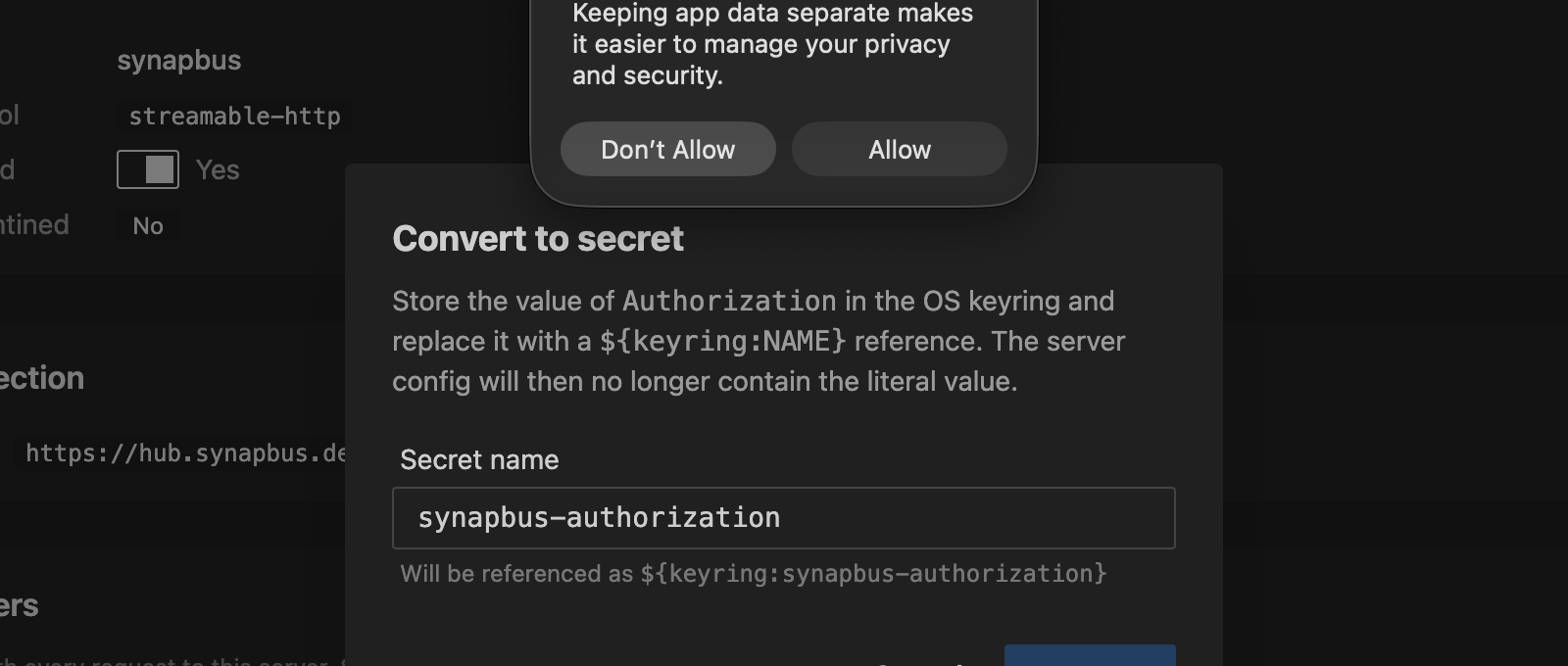
The Convert flow works even on masked headers: the backend has the real
value in mcp_config.json and never needs the client to send it.
${keyring:…} references render as a labeled chip instead of a masked
literal, so converted headers are visually distinct.
CLI
# Upsert one or more headers
mcpproxy upstream patch synapbus --header "X-Trace: on"

# Rotate Authorization in place
mcpproxy upstream patch synapbus --header "Authorization: Bearer new-token"

# Delete one
mcpproxy upstream patch synapbus --header-remove "X-Stale"

# Mix set + delete in a single round-trip
mcpproxy upstream patch synapbus --header "X-New: v" --header-remove "X-Old"

# Env vars (stdio servers)
mcpproxy upstream patch obsidian-pilot --env "LOG_LEVEL=debug"
mcpproxy upstream patch obsidian-pilot --env-remove "OBSOLETE"
See Management Commands for the full flag reference.
REST API
PATCH /api/v1/servers/{name} follows JSON Merge Patch
(RFC 7396):
curl -X PATCH -H "X-API-Key: $KEY" -H "Content-Type: application/json" \
  -d '{"headers":{"X-New":"value","X-Stale":null}}' \
  http://127.0.0.1:8080/api/v1/servers/synapbus
- non-null string value → upsert
- JSON
nullvalue → delete - key absent from body → preserve (this is how the UI sends a diff against the masked view without overwriting unchanged values)
A client that sends the whole map back is safe too: a value that is exactly
the mask the read path rendered for that key is reverted to the stored secret,
bound to the key it was read from. What cannot be bound to a key is refused
with 400 rather than written through — args, oauth.scopes,
isolation.extra_args, a mask moved to a different key, and a URL mask whose
scheme/host changed. Resend the real value, or omit the field.
See REST API › PATCH for the
full reference, including the
/config-to-secret
endpoint that backs the "Convert to secret" affordance.
Secret references
headers, env, args, url, command, oauth, and nested isolation fields
support secret references that are resolved when mcpproxy prepares that server’s
connection, not stored in plaintext on the wire after substitution:
| Reference | Source | Lifetime |
|---|---|---|
${keyring:NAME} | OS keyring entry called NAME | Persists across restarts; managed via the Secrets page or mcpproxy secrets CLI |
${env:VAR} | The VAR environment variable on the mcpproxy process | Tied to the shell/launcher that started mcpproxy |
${file:/absolute/path} | File contents (Compose/Kubernetes secret, systemd credential), one trailing newline removed | Read each time the server connection is built so a rotated file is picked up on the next connect or restart |
secret_file_dirs and ${file:}
Every ${file:} path must be absolute. For upstream servers, the file must lie
under one of the directories listed in secret_file_dirs
(or under platform defaults when the key is omitted). Set secret_file_dirs to
[] to disallow all file references; ["*"] is compatibility mode (startup
warning) but upstream reads still enforce the deny rules below.
CREDENTIALS_DIRECTORY, when set, is treated like an extra allow-list root on
load — useful for systemd user services that inject credentials beside the
process.
The proxy’s own api_key and data_dir use the same secret_file_dirs policy
when they carry ${file:} references. MCPPROXY_API_KEY_FILE is separate: it is
not limited by secret_file_dirs (see the config-file section above).
Upgrading from a release without secret_file_dirs: before #1721 any
absolute ${file:} path resolved. After the upgrade, a reference outside the
effective allow-list stops resolving, and that server fails to connect with
secret file is missing, unreadable or outside secret_file_dirs. With the key
omitted, macOS and Windows allow only <data-dir>/secrets, so a reference such
as ${file:/Users/me/.config/tokens/github} is affected. At startup mcpproxy
logs one warning naming every such server
(upstream ${file:} references are outside secret_file_dirs and will not resolve).
To migrate, either add the file's directory to secret_file_dirs in the config
file (for example "secret_file_dirs": ["/Users/me/.config/tokens"]; the
platform defaults are then replaced by your list, so add <data-dir>/secrets
too if you use it), or move the file under <data-dir>/secrets. A secret file
with more than one hard link is refused (see below), so copy a hardlinked secret
rather than linking it.
Reserved proxy namespace
Upstream expansion refuses the whole MCPPROXY_ environment namespace (including
MCPPROXY_CRED_KEY), using Windows case rules for the prefix. Proxy-owned
readers (api_key, data_dir, server-edition OAuth client fields) use a
proxy-scoped resolver and may still read those variables.
Files an upstream must never read
Even when a path is under an allowed root or secret_file_dirs is ["*"], an
upstream-scoped read refuses:
- The active config file and the active admin API key source file(s)
- Regular files directly under
<data-dir>(except under<data-dir>/secrets) - Regular files one level below
<data-dir>/certs,<data-dir>/index.bleve, or<data-dir>/tpa-lkg(not deeper subtrees) - Any file with more than one hard link
- An earlier version of the config file that this process replaced on save, when a hardlink to it was made before the save
Checks use the opened file’s identity (device and inode), so hardlinks, aliases,
and a config file replaced by rename are refused — not only a literal path match.
Secret files have no reason to be hard-linked: the link-count rule refuses a
hardlink to any live proxy file, wherever it is under <data-dir>.
Hardlink protection is best-effort against a local user who can already create
links in an allowed directory. The list of replaced config versions lives in
memory, holds the last 4096 saves, and is filled only by saves this process
makes: a restart, a save by a separate process (a mcpproxy CLI command
editing the config while the daemon runs) or 4096 later saves forget an older
version, and a link to it then reads as an ordinary file with one link. The
same is true of a hardlink to a log file that has since been rotated or
deleted: once the original name is gone, the link is the file's only link.
Keep allowed directories writable only by the account that runs mcpproxy.
["*"] resolves the path and then opens it by path, so it does not protect
against a concurrent filesystem writer that swaps a symlink in between; the
allow-list mode opens through the allowed root and does.
Policy denials vs load failures
A policy denial on one upstream server does not stop the daemon. That server
fails to connect or spawn; status, per-server logs, and mcpproxy doctor show a
fixed public message (no path or secret echoed), for example:
secret file is missing, unreadable or outside secret_file_dirssecret reference refused: this environment variable is reserved
Non-policy resolution failures may still use an internal placeholder until the
reference is fixed. Failures in proxy-key or data_dir policy during load
still abort startup.
Management surfaces (mcpproxy tools, mcpproxy call, the CLI upstream client,
and the daemon) all build the upstream resolver from the loaded config, so CLI
and runtime enforce one policy. Changing secret_file_dirs in the config file
hot-reloads the resolver; management APIs cannot widen the list.
When mcpproxy connects successfully it substitutes references with the actual secret; the reference itself never reaches the upstream MCP server. See Keyring Integration for the full secret-storage story.
Client Header Forwarding
MCPProxy can forward selected HTTP headers from the MCP client's request to an upstream server, for example X-Tenant-Id or a per-user X-User-Id, so an upstream that keys behaviour on a header can see it. It is enabled by default but inert until a server lists header names.
{
  "forward_client_headers": true,
  "mcpServers": [
    {
      "name": "tenant-api",
      "url": "https://api.example.com/mcp",
      "protocol": "streamable-http",
      "headers": { "Authorization": "Bearer static-token" },
      "forward_headers": ["X-Tenant-Id", "X-User-Id"]
    }
  ]
}
- Format:
forward_headersis a list of header names (case-insensitive, exact match, no wildcards, at most 32 per server). Values are never configured; they come from each inbound request. - Default and switches: the top-level
forward_client_headersdefaults to on when absent. Set it tofalse, or start withMCPPROXY_FORWARD_CLIENT_HEADERS=false|0|off, to stop all forwarding without editing servers. A server with noforward_headersforwards nothing. Changes apply to the next call, with no reconnect. - Precedence: forwarded headers have the lowest precedence. They never replace a header that MCPProxy, OAuth or the server's static
headersset. A name that equals a static header key is rejected on write and skipped at runtime, so the configured value always wins. On OAuth servers the upstream always receives MCPProxy's own token. - Deny list: these are never forwarded, even if listed:
Authorization,Proxy-Authorization,X-Api-Key,Cookie,Set-Cookie,Forwarded,X-Real-Ip,X-Forwarded-*;Host,Connectionand other hop-by-hop headers (and any name in the request's ownConnectionheader),Proxy-*;Content-*,Accept,Accept-Encoding,Range,If-*,Last-Event-Id,Mcp-*;Traceparent,Tracestate,Baggage,X-Request-Id,X-Mcpproxy-*,Sec-*;User-Agent,Origin,Referer. The filter is re-applied on every request; write-time validation is only a convenience. - Transports: streamable HTTP only (
protocol: http,streamable-http, orautoresolving to it). Header forwarding is not implemented for the deprecatedssetransport (SSE upstreams still work, they just never receive forwarded headers), andstdioservers have no HTTP request to carry headers. An allowlist on either is ignored, and a warning names the header. - Which upstream requests carry headers: only the
tools/callrequest made for a call that arrives on an MCP endpoint (/mcp,/mcp/alland the other MCP mounts):call_tool_read|write|destructive, directserver__toolcalls, andcode_executionsub-calls. These never carry them:initialize,tools/list, prompts, pings and notifications, reconnects (includingreconnect_on_use), health checks, background discovery and indexing,upstream_servers refresh, quarantine inspection, the REST API (/api/v1/tools/calland friends), the CLI, and OAuth flows. - Limits: each value at most 4 KiB, 16 KiB total per request. Oversized values, empty values and values with control characters are dropped. Repeated inbound headers are joined with
,. - Redirects: if an upstream redirects a
tools/callto a different origin, the forwarded headers are removed from the redirected request. - Redaction: MCPProxy never writes forwarded values to logs, the activity log, tool-call records, audit lines, events or error text; only names appear. Trace logging masks them too. If an upstream echoes a value back in an error or a result, the copy MCPProxy stores or logs has it replaced by
[forwarded:<Name>]. This is best effort: it catches the exact value (and its JSON-escaped form), not a transformed one (base64, URL-encoding, hashing, splitting), and values shorter than 4 characters are only caught in name-anchored forms. The client still receives the unmodified result. Results that came from a call with forwarded headers are only served fromread_cacheto a request carrying the same forwarded values. - Trust warning: forwarded values are unverified client assertions, not authenticated identity. Any client that can reach
/mcpcan send any value, including another user'sX-User-Id. MCPProxy copies values and does not check them. Only forward a header to an upstream that authenticates it some other way, or when every client that can reach MCPProxy is trusted to assert it. - Limitations: MCPProxy keeps one shared upstream session per server, so
initializenever carries client headers and session-bound identity is not supported. Sampling, elicitation and the session-close request carry none. Plainhttp://to a non-loopback upstream sends values in cleartext.
To verify locally, run mcpfixture --transport http --port 18080 --echo-headers and call its echo_headers tool through MCPProxy; it returns the headers the upstream received.
Docker Isolation
For enhanced security, stdio servers can run in Docker containers:
{
  "name": "isolated-server",
  "command": "npx",
  "args": ["-y", "some-mcp-server"],
  "protocol": "stdio",
  "isolation": {
    "enabled": true,
    "image": "node:20",
    "network_mode": "bridge"
  }
}
Note: Memory and CPU limits are configured at the global level in docker_isolation, not per-server.
See Docker Isolation for complete documentation.
Process Lifecycle
Startup
When MCPProxy starts, it:
- Loads server configurations from
mcp_config.json - Creates MCP clients for each enabled, non-quarantined server
- Connects to servers in the background (async)
- Indexes tools once connections are established
Reconnecting after a failure
A server that fails to connect is retried with exponential backoff: 1s, 2s, 4s and so on, up to 5 minutes between attempts. After 20 failures in a row MCPProxy stops the regular retries and probes the server every 30 minutes instead, so a remote that is really gone is not called over and over. Restart in the tray or Web UI, or mcpproxy upstream restart <name>, retries at once.
After a network outage or sleep. A remote (HTTP/SSE) server whose last failure was a network failure (DNS lookup, connection refused, a timeout before the upstream answered) is also watched for the network coming back. A laptop that sleeps overnight gives up on its remote servers this way, and used to leave them in Error for up to 30 minutes after waking. While such a server is down, MCPProxy opens a plain TCP connection to its host every 10 seconds. After 5 minutes of failed probes it slows to every 30 seconds. It sends no request to the server and none of its credentials. Behind an HTTP proxy (HTTPS_PROXY), an https server is probed by asking the proxy to CONNECT to it, so a proxy that stays up while the network behind it is down does not hide the outage. Any credentials in the proxy URL are sent to the proxy, as with every request. A plain-http server, or one behind an https:// or SOCKS proxy, is probed at the proxy only.
- The network comes back. When probes that were failing start to succeed, MCPProxy clears the server's backoff and reconnects it. The server is back within one probe interval, usually a few seconds. An OAuth token that expired meanwhile is refreshed right away, even if earlier refreshes failed while the network was gone.
- The computer wakes, or its network changes. After a wake or a change of network addresses, a server waiting on the network gets one reconnect attempt as soon as its host answers. If that attempt fails, the normal backoff continues.
The watcher reconnects a server at most once every 30 seconds. If three of its reconnects in a row do not connect, for example because the remote is only reachable on and off or the network keeps changing, it stops clearing the backoff. It then doubles the wait between its attempts, up to 30 minutes, until the server connects again.
It leaves alone a server that is disabled or quarantined, is awaiting sign-in, failed on credentials (for example a rejected token, HTTP 401), was stopped as permanently broken, or was told by the upstream to wait (Retry-After). A server whose host stays reachable while the server itself keeps failing is left to the normal backoff. Local (stdio) servers are not watched.
How an outage is shown. While MCPProxy is still retrying a server that failed on the network, it is shown as temporary, not as a failure:
| Surface | What you see |
|---|---|
mcpproxy upstream list | STATUS Connecting, summary Reconnecting: <cause> (for example Reconnecting: host not found) in -o json |
| Web UI | the server card reads Reconnecting: <cause>; the server page shows an amber Reconnecting automatically panel with when the next attempt is due |
mcpproxy doctor | not listed under connection errors or Needs attention |
Restart stays available to retry at once. After 20 failed attempts the server is listed as an error again, while it keeps being probed every 30 minutes and reconnected as soon as the network returns.
An OAuth server whose token expired while its refresh was failing temporarily (offline, or the provider answering 5xx) shows Token refresh pending with the next refresh attempt, not Sign in: the refresh is retried automatically. Sign in is offered only when sign-in is really needed: no token yet, no refresh token, or a refresh token the provider rejected (invalid_grant).
To turn the watcher off, set MCPPROXY_NETWORK_RECOVERY=off in the environment of mcpproxy serve.
Shutdown
When MCPProxy stops, it performs graceful shutdown of all subprocesses:
- Graceful Close (10s): Close MCP connection, wait for process to exit
- Force Kill (9s): If still running, SIGTERM → poll → SIGKILL
Process groups: Child processes (spawned by npm/npx/uvx) are placed in a process group, ensuring all related processes are terminated together.
See Shutdown Behavior for detailed documentation.
Quarantine System
New servers added via AI clients are automatically quarantined for security review. See Security Quarantine for details.